We tested the top ai tools for creating social media posts in 2026 — from caption generators to full visual post builders — and narrowed it down to the 10 best. Whether you need ai tools for social media content creation across Instagram, LinkedIn, Facebook, or TikTok, there’s a tool here that fits your workflow. The best all-rounder for visuals is Canva AI. For captions and copy, ChatGPT wins. For automation and scheduling, Buffer AI leads the pack.
📋 Table of Contents
- How AI Changes Social Media Post Creation
- Best AI Tools for Creating Social Media Posts
- 1. Canva AI — Best for Visual Post Creation
- 2. ChatGPT — Best for Captions & Copy
- 3. Predis.ai — Best All-in-One Post Generator
- 4. Buffer AI — Best for Scheduling & Automation
- 5. Jasper — Best for Brand-Consistent Posts
- 6. Lately AI — Best for Repurposing Content into Posts
- 7. Claude — Best for LinkedIn & Long-Form Posts
- 8. Hootsuite OwlyWriter AI — Best for Teams & Agencies
- 9. FeedHive — Best for Multi-Account Post Management
- 10. Copy.ai — Best Free Caption Generator
- Best AI Tools by Platform
- AI Tools for Social Media Automation
- Quick Comparison Table
- FAQs
How AI Changes Social Media Post Creation
Creating social media posts sounds simple — until you’re staring at a blank caption box for the sixth time that day, trying to write something engaging for an audience that’s seen everything. For brands, creators, and marketers, the volume of content social media demands is genuinely relentless.
That’s exactly why ai tools for social media posts have moved from “experimental” to “essential” over the last two years. The numbers are hard to ignore: teams using AI for social media content creation report producing 3–5x more content per week without increasing headcount or working more hours.
The best social media ai tools now cover every stage of post creation:
- Caption writing — generating engaging captions, hooks, and hashtags in seconds
- Visual design — creating on-brand graphics, carousels, and story templates without design skills
- Post ideas — brainstorming content calendars and trending topic angles
- Scheduling & automation — publishing across platforms at optimal times automatically
- Repurposing — turning blog posts, podcasts, and videos into platform-ready social posts
Best AI Tools for Creating Social Media Posts
Here are the 10 best tools — tested, ranked, and chosen for their real-world usefulness across every major platform and content type.
Canva AI is the most-used tool for social media visual creation — and Magic Studio has made it dramatically more powerful. Magic Design generates fully styled post templates from a text description. Text to Image creates custom AI visuals on demand. One-click resize adapts any post instantly to Instagram square, Instagram story, LinkedIn banner, Facebook post, and Pinterest pin simultaneously. Magic Write generates caption ideas directly inside your design. For anyone who needs to produce great-looking posts fast without a design background, Canva is the clearest answer among all ai tools for creating social media posts today.
✅ Pros
- One-click resize for all platforms
- Excellent free plan
- No design skills needed
- AI image generation included
❌ Cons
- AI features limited on free plan
- Can look templated without tweaking
- Not for complex illustration work
ChatGPT is the fastest way to generate social media captions for any platform, tone, or brand voice. Ask it for 10 Instagram caption variations for a product launch and you have them in 30 seconds. Need a LinkedIn post that sounds professional but still human? Done. Want 5 different hooks for a Facebook ad? Easy. The key advantage is flexibility — ChatGPT isn’t locked to a specific template or format. It adapts to any niche, any tone, and any platform style when you prompt it correctly. As a free ai tool for generating social media captions, nothing else matches its versatility and output quality at zero cost.
✅ Pros
- Best free caption generation tool
- Works for any platform or niche
- Generates bulk variations fast
- Adapts to any brand voice
❌ Cons
- No built-in scheduling or publishing
- Needs good prompting for best output
- Free plan has usage limits
Predis.ai is the most complete all-in-one tool for creating ready-to-publish posts. Type in a topic or paste a URL, and it generates a full post — caption, visual, and hashtags — formatted for whichever platform you choose. It’s one of the strongest ai tools for instagram content creation and ai tools for linkedin content creation because it understands each platform’s style and formats accordingly. The competitor analysis feature shows you what’s performing in your niche right now, helping you create posts around proven content angles rather than guessing. For anyone who wants a complete post ready to publish in under two minutes, Predis delivers consistently.
✅ Pros
- Generates visual + caption + hashtags
- Platform-specific formatting
- Competitor content analysis
- Ready to publish in 2 minutes
❌ Cons
- Free plan very limited
- Visual quality can vary
- Smaller community & support
Buffer AI combines post creation with scheduling — so you’re not just generating captions, you’re getting them live at the right time. Its AI Assistant writes platform-optimised captions from a topic or URL, then suggests the best posting times based on your specific audience’s activity patterns. The free plan covers 3 channels, making it one of the best free ai tools for social media posts with genuine scheduling capability. For anyone managing a consistent posting schedule, Buffer removes the daily friction of remembering when and where to post — it handles the logistics so you can focus on the content.
✅ Pros
- AI captions + scheduling in one tool
- Optimal time suggestions per audience
- Very clean interface
- Generous free plan
❌ Cons
- Analytics limited on free plan
- No social inbox on lower tiers
- Less powerful than Hootsuite for agencies
When you’re creating posts for multiple brands or clients, the biggest challenge isn’t speed — it’s consistency. Each brand needs to sound different. Jasper’s Brand Voice feature solves this precisely: train it on each brand’s existing content and it writes every new post in that exact tone, vocabulary, and style. Its social media templates cover Instagram captions, LinkedIn posts, Twitter threads, Facebook updates, and ad copy — all optimised for each platform’s format. For agencies and social media managers handling ai tools for social media marketing across multiple brands, Jasper is the most reliable tool for keeping every account sounding distinctly on-brand.
✅ Pros
- Best brand voice consistency
- Platform-specific social templates
- Campaign workflow for full content sets
- Team collaboration built-in
❌ Cons
- Expensive — $39/month
- No free plan (trial only)
- Overkill for single-brand users
Lately AI specialises in content repurposing — and it does it better than anything else. Paste in a blog post URL, upload a podcast transcript, or drop in a video, and Lately generates dozens of ready-to-post social media captions from the source material automatically. It also learns over time: the more you use it, the better it gets at identifying which parts of your content resonate with your specific audience. One 2,000-word blog post becomes 30–40 social posts across LinkedIn, X, and Facebook in minutes. For ai tools for social media post ideas drawn from existing content, Lately is genuinely in a category of its own.
✅ Pros
- Turns long content into 30+ posts
- Learns your top-performing content
- Works with blogs, podcasts & video
- Huge content volume from little input
❌ Cons
- Posts still need human review
- Limited platform integrations
- Not great for visual-first platforms
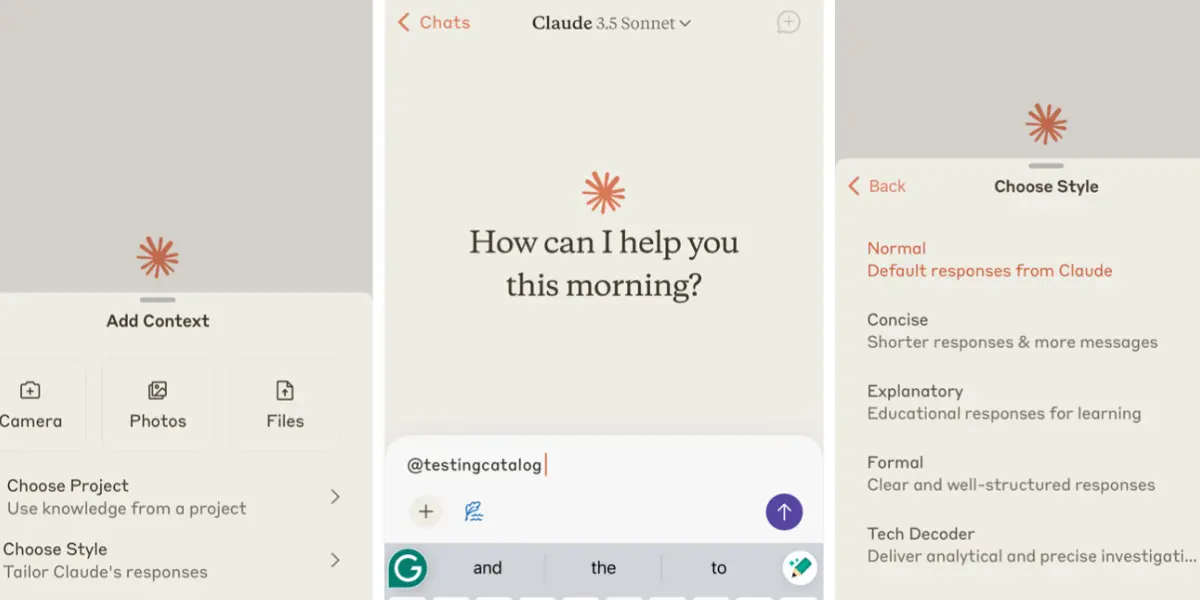
LinkedIn has a very different content culture from Instagram — it rewards substance, nuance, and genuine expertise rather than aesthetic polish. Claude is the strongest ai tool for linkedin content creation precisely because it produces writing that sounds thoughtful and human rather than AI-generated. It’s noticeably better at writing long-form LinkedIn posts, carousels, and opinion pieces that actually add value rather than just filling space. Where ChatGPT can default to a generic business tone, Claude adapts naturally to a specific voice and writes with genuine depth. For professionals and executives building a personal brand on LinkedIn, Claude is the top choice.
✅ Pros
- Best writing quality for LinkedIn
- Human-sounding, non-formulaic output
- Great for long-form social content
- Strong at nuanced opinion pieces
❌ Cons
- No visual creation or scheduling
- Free plan has daily limits
- Less versatile for short-form platforms
Hootsuite is the industry standard for teams managing social media at scale — and with OwlyWriter AI built in, it’s a genuinely complete platform for creating and publishing posts. OwlyWriter generates captions from a topic or URL, repurposes top-performing posts into fresh content, and suggests caption ideas based on trending topics in your industry. Add in Hootsuite’s scheduling, unified social inbox, approval workflows, and analytics, and you have everything a team needs in one place. For agencies using ai tools for social media marketing across multiple client accounts, this is the most comprehensive solution available.
✅ Pros
- AI creation + scheduling in one platform
- Team approval workflows
- Deep analytics & reporting
- Unified social inbox
❌ Cons
- Expensive — starts at $99/month
- Overkill for solo users
- Complex interface for beginners
FeedHive is one of the smartest ai tools for scheduling social media posts — it goes beyond simple scheduling to actually predict performance before you publish. Its AI assigns each post a performance prediction score based on your historical data, suggests the optimal posting time per account, and automatically recycles evergreen content so your best posts keep working. The Conditional Posting feature lets you set rules: “if this post hits 100 likes in 3 hours, automatically share to Stories.” For social media managers who want ai tools for social media automation without the enterprise price tag of Hootsuite, FeedHive delivers intelligent automation at a fraction of the cost.
✅ Pros
- AI performance prediction per post
- Smart content recycling
- Conditional posting rules
- Very affordable at $19/month
❌ Cons
- Less established than Buffer or Hootsuite
- Analytics not as deep as Sprout Social
- Limited team collaboration features
Copy.ai is one of the best free ai tools for social media posts when you just need captions and short-form copy fast. Its social media templates cover Instagram captions, Facebook posts, LinkedIn updates, Twitter posts, and hashtag sets — all accessible from a simple interface with no prompting knowledge required. The free plan is generous enough for casual creators and small businesses who don’t need to publish at high volume. It’s not the most powerful tool on this list, but for ai tools for social media post ideas and quick caption generation without paying anything, Copy.ai is one of the most accessible starting points available.
✅ Pros
- Generous free plan
- Simple interface — no prompting needed
- Platform-specific caption templates
- Hashtag generation included
❌ Cons
- Output quality behind ChatGPT or Jasper
- Paid plan expensive at $49/month
- No visual creation or scheduling
Best AI Tools by Platform
Different platforms need different approaches. Here’s the best AI tool match for each major platform — so you can pick based on where you actually post.
- Canva AI — best for visual posts & Reels covers
- Predis.ai — best for complete post generation
- ChatGPT — best free caption writer
- Buffer AI — best for scheduling & timing
- Claude — best for quality long-form posts
- Jasper — best for brand-consistent copy
- Lately AI — best for repurposing content
- ChatGPT — best free LinkedIn post writer
- Buffer AI — best for scheduling & timing
- Hootsuite AI — best for page management
- ChatGPT — best for post copy & ads
- Copy.ai — best free option
🐦 X / Twitter
- ChatGPT — best for threads & tweets
- FeedHive — best for scheduling & recycling
- Lately AI — best for repurposed tweets
- Claude — best for thread writing quality
AI Tools for Social Media Automation
Creating great posts is only half the job — the other half is making sure they actually get published consistently, at the right time, on the right platforms. Here’s how the best tools handle automation:
- Buffer AI — analyses your audience activity and suggests optimal posting times; queues content automatically
- FeedHive — predicts post performance before publishing; recycles evergreen content automatically; conditional posting rules
- Hootsuite — enterprise-grade scheduling, approval workflows, and automated posting across unlimited accounts
- Lately AI — automatically generates social posts from long-form content without manual input
- Predis.ai — schedules complete posts (visual + caption + hashtags) directly from within the platform
For most solo creators and small businesses, Buffer AI covers all the automation needs you actually have at a price that makes sense. For agencies managing multiple client accounts, Hootsuite or FeedHive provide the depth of control required.
Quick Comparison Table
| Tool | Free Plan | Paid Plan | Platforms | Best For |
|---|---|---|---|---|
| Canva AI | ✅ Generous | $15/mo | All | Visual post creation |
| ChatGPT | ✅ Yes | $20/mo | All | Captions & copy |
| Predis.ai | ✅ Limited | $32/mo | IG, LI, FB, TT | Complete post generation |
| Buffer AI | ✅ 3 channels | $6/mo | All | Scheduling & timing |
| Jasper | ❌ Trial | $39/mo | All | Brand-consistent posts |
| Lately AI | ✅ Trial | $49/mo | LI, X, FB, IG | Content repurposing |
| Claude | ✅ Yes | $20/mo | LI, X, FB | LinkedIn & long-form |
| Hootsuite AI | ❌ Trial | $99/mo | All | Agency multi-account |
| FeedHive | ✅ Yes | $19/mo | LI, X, IG, FB | Smart automation |
| Copy.ai | ✅ Generous | $49/mo | All | Free caption generation |
AI Tools for Social Media Content Creation — What Actually Works
The most effective approach to AI-powered social media content isn’t using one tool for everything — it’s combining a writing tool with a visual tool and a scheduling tool. The trio of ChatGPT (captions) + Canva AI (visuals) + Buffer AI (scheduling) covers every major step of post creation and publishing, costs under $35/month combined, and has a free plan at every stage if you want to start without spending anything.
For brands with bigger content demands — multiple accounts, brand voice consistency, content repurposing from long-form assets — adding Jasper or Lately AI into that workflow handles the volume and consistency challenges that manual creation can’t keep up with.
What AI Tools Can Create Social Media Posts?
The most capable tools for creating complete social media posts are Predis.ai (generates visual + caption + hashtags in one step), Canva AI (best for visual-first posts), ChatGPT (best for captions and copy), Buffer AI (best with scheduling built in), and Jasper (best for brand-consistent posts across multiple accounts). Each specialises in a different part of what “creating a post” actually means.
Which AI Tool Is Best for Social Media Content?
It depends on what type of content you create. For visual-heavy platforms like Instagram: Canva AI. For caption and copy quality: ChatGPT or Claude (especially for LinkedIn). For complete posts including visuals: Predis.ai. For scheduling and timing: Buffer AI. For agencies managing multiple clients: Hootsuite with OwlyWriter AI.
Can AI Generate Social Media Posts Automatically?
Yes — several tools now automate significant parts of the process. Buffer AI and FeedHive schedule posts automatically at optimal times. Lately AI generates posts from long-form content without manual input. FeedHive recycles evergreen content on autopilot. Predis.ai generates complete posts from a topic or URL in under two minutes. Full automation from idea to published post is achievable — it just requires choosing the right combination of tools for your workflow.
Are AI Tools Good for Social Media Marketing?
Yes — with one condition: they need human oversight to stay authentic. The brands and creators seeing the best results from AI-assisted social media are the ones treating it as a production accelerator, not a replacement for strategy. AI handles the execution — writing captions, designing graphics, suggesting posting times — while humans handle the strategy, brand voice, and audience relationships. That combination is genuinely powerful for social media marketing at any scale.
Frequently Asked Questions
🏆 Final Verdict
The best AI tools for creating social media posts in 2026 aren’t about replacing your creativity — they’re about removing the production bottlenecks that slow you down between idea and published post.
Our top starter stack for most people: Canva AI for visuals (free), ChatGPT for captions (free), and Buffer AI for scheduling ($6/month). That combination covers every major platform and the entire post creation workflow for under $10/month. For agencies and teams needing brand voice consistency and multi-client management, add Jasper and Hootsuite.
Start with the free tools. Build the workflow. Then invest in the paid upgrades once you’re posting consistently and know exactly which bottlenecks are still slowing you down.
Found this helpful? Share it! 🙌