After testing 20+ AI tools over four weeks, we narrowed it down to the 10 best AI tools for freelancers in 2026. Whether you write, design, code, or manage clients — this list has something for you. The best all-rounder is ChatGPT, but the right tool depends on your specific freelance niche and where your time gets eaten the most.
📋 Table of Contents
- Why Freelancers Need AI Tools in 2026
- The 10 Best AI Tools for Freelancers
- 1. ChatGPT — Best All-Rounder
- 2. Claude by Anthropic — Best for Writing
- 3. Grammarly — Best for Proofreading
- 4. Canva AI — Best for Design
- 5. Notion AI — Best for Organization
- 6. Perplexity AI — Best for Research
- 7. Jasper — Best for Marketing Copy
- 8. Otter.ai — Best for Client Calls
- 9. Surfer SEO — Best for SEO Writers
- 10. HoneyBook AI — Best for Client Admin
- Quick Comparison Table
- Best AI Stack by Freelance Niche
- FAQs
Why Freelancers Need AI Tools in 2026
Freelancing sounds like freedom — until you realise you’re the writer, the designer, the project manager, the accountant, and the sales team all at once. Sound familiar?
Here’s the reality: the best ai tools for freelancers aren’t just productivity hacks anymore. They’re the difference between scrambling to hit deadlines and actually building a business that runs smoothly. According to recent industry data, 77% of freelancers now use AI tools in their daily workflow — and those who do report 20–40% productivity gains on average.
That’s not a small edge. That’s the difference between landing 3 clients a month and landing 5 — without working extra hours.
The most commonly used freelance AI tools fall into these categories:
- Writing & editing — proposals, blog posts, emails, reports
- Design — social graphics, presentations, client decks
- Research — fast fact-checking, market research, sourcing
- Client management — contracts, invoices, meeting notes
- Planning & SEO — content calendars, keyword research, optimization
The 10 Best AI Tools for Freelancers in 2026
Here are our top picks, ranked by overall value, ease of use, and real-world usefulness across every type of freelance work.
ChatGPT is the single most versatile AI tool for freelancers in 2026. Whether you’re drafting a client proposal at 11pm, debugging a script, brainstorming ideas for a campaign, or summarising a long brief — it handles all of it. The free tier is genuinely capable, but the Plus plan unlocks GPT-4o which is noticeably faster and smarter for daily freelance work. Think of it as the Swiss Army knife of freelance AI tools — not perfect at everything, but useful for almost everything.
✅ Pros
- Handles almost every freelance task
- Great free tier to start
- Constantly improving
- Huge community & tutorials
❌ Cons
- Can produce generic output
- Needs good prompting skills
- Usage limits on free plan
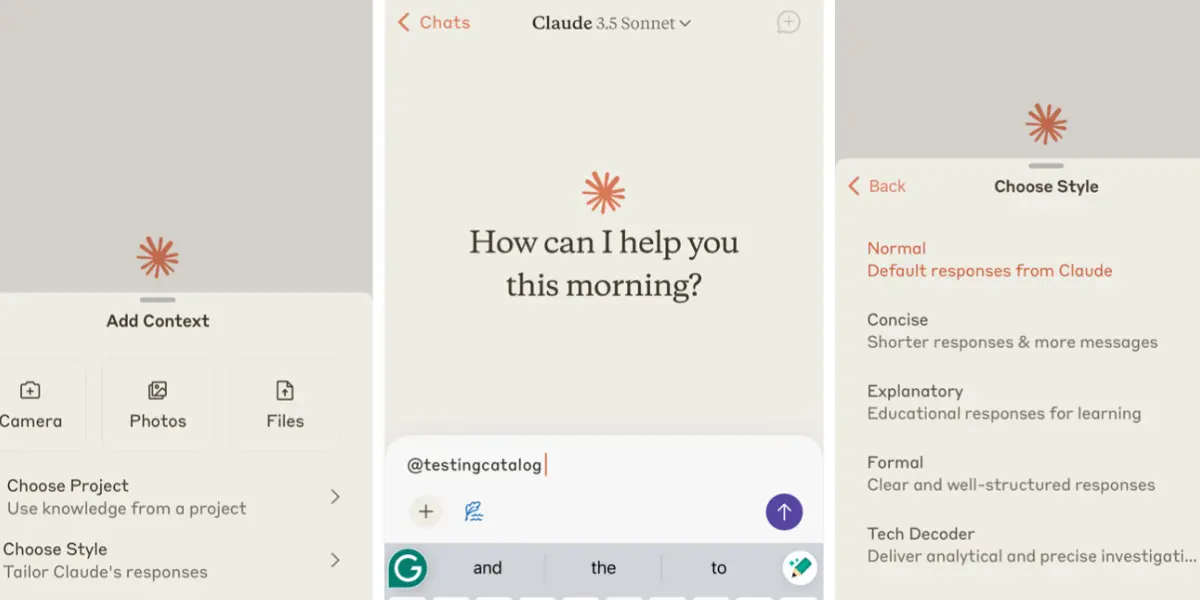
Claude is the writer’s AI. Where ChatGPT excels at breadth, Claude excels at depth. It’s noticeably better at maintaining a consistent tone across long documents, editing existing content without making it sound robotic, and handling complex reasoning tasks. If your freelance work involves a lot of writing, editing, or research — Claude is worth the $20/month. It’s one of the best ai tools for freelance writing and design work that requires real quality, not just speed.
✅ Pros
- Superior long-form writing quality
- Excellent at editing & rewriting
- More nuanced & human-sounding
- Great context retention
❌ Cons
- Less versatile than ChatGPT
- No image generation
- Free plan has daily limits
No matter how good your AI writing assistant is, Grammarly catches what it misses. It’s the final polish step every freelancer should use before sending anything to a client. The free version handles grammar and spelling perfectly. The Pro version adds tone suggestions, clarity improvements, and plagiarism checks — genuinely useful before submitting client deliverables. As a freelancer, your writing represents your brand. Grammarly makes sure it always looks professional.
✅ Pros
- Works everywhere (browser extension)
- Excellent free tier
- Catches errors AI misses
- Tone & clarity suggestions
❌ Cons
- Can over-edit your voice
- Pro plan adds up monthly
- Not a full writing tool
Canva’s Magic Studio has quietly become one of the most powerful free AI tools for freelancers who create any kind of visual content. Text-to-image, AI background removal, Magic Write, and smart resize — all partially available on the free plan. If you create social media graphics, presentations, or client decks, Canva saves hours every week. It’s one of the most-used ai tools for independent workers who need to look professional without hiring a dedicated designer.
✅ Pros
- Excellent free plan
- No design skills needed
- Huge template library
- All-in-one visual tool
❌ Cons
- AI features limited on free plan
- Not for complex design work
- Can look templated
If you already use Notion to manage clients and projects, the AI add-on is a no-brainer. It turns your existing notes and context into a writing assistant that actually knows your projects. Summarise meeting notes, draft client updates, plan your week, and organise your entire freelance business in one place. It’s one of the best ai tools for managing freelance clients — especially if you juggle multiple clients at once and need everything in one spot.
✅ Pros
- Knows your project context
- All-in-one workspace
- Great for content planning
- Very beginner-friendly
❌ Cons
- Only useful if you use Notion
- AI less powerful than ChatGPT
- Can be complex to set up
Perplexity AI is what Google Search would be if it gave you a synthesised answer with citations instead of a list of links to wade through. For freelancers who bill hourly, this matters — getting a clean, cited research summary in 30 seconds instead of opening 12 browser tabs is a genuine time-saver. It’s one of the best productivity ai tools for freelancers who do a lot of writing, consulting, or content research as part of their work.
✅ Pros
- Real-time web search with citations
- Great free tier
- Saves hours of research time
- Always up-to-date
❌ Cons
- Not for content generation
- Pro searches limited on free plan
- Can miss nuanced context
Jasper is built specifically for marketers and copywriters who need to produce large volumes of on-brand content for clients. Unlike ChatGPT’s open-ended approach, Jasper offers structured templates for ads, emails, landing pages, and social posts. Its brand voice feature learns to write in your client’s style — which is a massive advantage when you’re managing content for multiple brands at once. It’s one of the best ai tools to automate freelance work at scale.
✅ Pros
- Brand voice consistency
- Marketing-specific templates
- Great for client campaigns
- Team collaboration features
❌ Cons
- Expensive at $39/month
- Overkill for non-marketers
- No free plan
If you have regular client calls, Otter.ai is a game changer. It automatically transcribes your meetings, highlights action items, and generates summaries — so you can focus on the conversation instead of scribbling notes. The free plan gives you 300 minutes of transcription per month which covers most freelancers. It’s especially useful for ai tools for remote freelancers who run all their client meetings over Zoom or Google Meet.
✅ Pros
- Auto meeting summaries
- Works with Zoom & Google Meet
- Generous free plan
- Highlights action items
❌ Cons
- Accuracy drops with accents
- Free plan has limits
- Not great for noisy calls
If you write SEO content for clients, Surfer SEO is the tool that takes your articles from “good” to “ranking.” It analyses the top-ranking pages for your target keyword and tells you exactly what to include — headings, word count, keywords, and structure — all based on actual data, not guesswork. Freelance SEO writers who use Surfer consistently report faster rankings and happier clients. It’s the most powerful ai software for freelancers who depend on Google traffic.
✅ Pros
- Data-driven content scoring
- Dramatically improves rankings
- Integrates with Google Docs
- Keyword clustering tool
❌ Cons
- Expensive for solo freelancers
- No free plan
- Learning curve exists

HoneyBook AI handles all the admin work that eats into your billable hours. Proposals, contracts, invoices, and client onboarding — all streamlined in one place. Its AI helps you write proposals faster, follow up automatically, and manage your entire client pipeline. If admin is your biggest time sink as a freelancer, HoneyBook pays for itself quickly. It’s genuinely one of the best ai tools for managing freelance clients end-to-end — from first inquiry to final invoice.
✅ Pros
- All-in-one client management
- Saves hours on admin work
- Professional proposals & contracts
- Automated follow-ups
❌ Cons
- Not cheap for new freelancers
- US-focused features
- Overkill for very small workloads
Quick Comparison Table
| Tool | Free Plan | Paid Plan | Best For | Our Rating |
|---|---|---|---|---|
| ChatGPT | ✅ Yes | $20/mo | All freelancers | ⭐⭐⭐⭐⭐ |
| Claude | ✅ Yes | $20/mo | Writers & editors | ⭐⭐⭐⭐⭐ |
| Grammarly | ✅ Great | $12/mo | All freelancers | ⭐⭐⭐⭐⭐ |
| Canva AI | ✅ Generous | $15/mo | Designers & marketers | ⭐⭐⭐⭐⭐ |
| Notion AI | ✅ Notion free | +$10/mo | Organised freelancers | ⭐⭐⭐⭐ |
| Perplexity AI | ✅ Yes | $20/mo | Writers & consultants | ⭐⭐⭐⭐ |
| Jasper | ❌ Trial only | $39/mo | Marketers & copywriters | ⭐⭐⭐⭐ |
| Otter.ai | ✅ 300 min | $10/mo | Consultants & coaches | ⭐⭐⭐⭐ |
| Surfer SEO | ❌ No | $89/mo | SEO writers | ⭐⭐⭐⭐ |
| HoneyBook AI | ✅ Trial | $19/mo | Client admin | ⭐⭐⭐⭐ |
Best AI Stack by Freelance Niche
Not every freelancer needs every tool. Here’s the best AI stack for your specific niche — pick what fits and ignore the rest.
✍️ Freelance Writer / Blogger
- ChatGPT — drafting, outlines, ideas
- Claude — long-form quality writing
- Grammarly — final proofreading
- Surfer SEO — if you write SEO content
🎨 Freelance Designer
- Canva AI — quick client graphics
- ChatGPT — writing briefs & emails
- HoneyBook AI — proposals & invoicing
- Notion AI — project management
💻 Freelance Developer
- ChatGPT — code generation, debugging
- Claude — technical documentation
- Notion AI — project management
- Otter.ai — client call notes
📣 Freelance Marketer
- Jasper — brand-consistent copy
- Canva AI — visual content
- Surfer SEO — SEO optimization
- Perplexity — fast research
What AI Tools Should Freelancers Use?
The answer depends entirely on where your time gets wasted most. If it’s writing — start with ChatGPT or Claude. If it’s design — Canva AI. If it’s admin — HoneyBook. If it’s research — Perplexity. There’s no one-size-fits-all answer, but there’s always a right answer for your specific workflow.
For most freelancers just starting out with AI tools for freelancing, the best starting stack is simple: ChatGPT (free) + Grammarly (free) + Canva (free). That trio costs nothing and covers writing, polish, and visuals — the three things most freelancers need every day.
How Can AI Help Freelancers?
AI helps freelancers in three specific ways that actually move the needle:
- Speed — tasks that took 2 hours take 30 minutes. First drafts, research summaries, design mockups — AI cuts the time dramatically.
- Quality — AI tools catch errors, improve clarity, and suggest better angles you might not have thought of on your own.
- Capacity — when each project takes less time, you can take on more clients without burning out. That’s how AI tools for freelancers to save time directly translate into higher income.
Say you’re a freelance writer who produces 3 articles a week. With AI helping on research, outlines, and first drafts, you could realistically produce 5–6 articles a week — without working longer hours. That’s a 60–80% capacity increase from the same number of working hours.
Are AI Tools Worth It for Freelancers?
Yes — but only when you use them the right way. The freelancers who waste money on AI are the ones who expect it to do everything for them. AI output without human editing is usually obvious, often mediocre, and sometimes embarrassing to send to a client.
The freelancers getting real value from AI are using it as a starting point, not a finished product. They use AI to get unstuck, move faster, and handle the repetitive parts — while their own expertise, judgment, and voice carries the work across the finish line.
Can Freelancers Use AI to Increase Income?
Absolutely — and here’s exactly how it works. More output in the same hours means more client revenue. Faster turnaround means happier clients who give you repeat work and referrals. Better quality (with AI as a QA layer) means fewer revisions and stronger positioning to charge premium rates.
The freelancers using the best ai tools for freelance work aren’t just saving time. They’re reinvesting that time into higher-value activities — pitching better clients, upselling existing ones, and building assets like courses or productised services that generate income beyond 1:1 client work.
Which AI Tool Is Best for Freelancing?
If you can only pick one: ChatGPT. It’s the most flexible, has a solid free tier, and works across every freelance niche — writing, coding, research, client communication, and more. If you write a lot and need real depth and quality: Claude. If you do a lot of SEO work: Surfer SEO. If you’re drowning in admin: HoneyBook AI.
Frequently Asked Questions
🏆 Final Verdict
The best AI tools for freelancers in 2026 aren’t the most expensive or the most hyped. They’re the ones that actually fit your workflow and save you time on the tasks that eat your week.
If we had to pick just three for every freelancer to start with today: ChatGPT for writing and research, Grammarly for polishing, and Canva AI for visuals. That stack costs about $32/month combined — and will easily save you 8–12 hours every single week.
Start with one. Get good at it. Then add another. That’s how freelancers go from overwhelmed to operating like a one-person agency.
Found this helpful? Share it! 🙌