We tested and compared the top chatgpt alternatives available in 2026 — free and paid — across writing, coding, research, and everyday use. The truth is, several ai tools like chatgpt are not just comparable — some are genuinely better in specific areas. The Best ChatGPT Alternative is Claude by Anthropic, but the right pick depends on exactly what you need. Here’s the full breakdown.
📋 Table of Contents
- Why Look for ChatGPT Alternatives?
- Free ChatGPT Alternatives
- 1. Claude — Best Free Alternative Overall
- 2. Google Gemini — Best Free for Search Integration
- 3. Microsoft Copilot — Best Free for Office Users
- 4. Perplexity AI — Best Free for Research
- 5. Meta AI — Best Free & No Login Required
- Paid ChatGPT Alternatives
- 6. Claude Pro — Best Paid for Writing
- 7. Gemini Advanced — Best Paid for Google Users
- 8. Jasper — Best Paid for Content Creation
- 9. GitHub Copilot — Best Paid for Coding
- 10. Perplexity Pro — Best Paid for Research
- AI Tools Like ChatGPT for Different Use Cases
- Quick Comparison Table
- FAQs
Why Look for ChatGPT Alternatives?
ChatGPT is genuinely excellent — but it’s not the right tool for every situation. People look for alternatives to chatgpt for a few different reasons, and all of them are valid.
Maybe you’ve hit the rate limits on the free plan one too many times. Maybe you need more accurate, real-time information and ChatGPT keeps giving you outdated answers. Maybe you want something better for coding, or for long documents, or you just want to try something without creating an account.
Here’s a quick summary of the main reasons people switch:
- Accuracy — ChatGPT can hallucinate confidently. Some chatgpt competitors handle this better.
- Real-time search — ChatGPT’s knowledge cutoff means recent events are a blind spot without plugins.
- Rate limits — The free plan has usage caps that frustrate power users.
- Privacy — Some users prefer tools that don’t use conversations for training.
- Specialist use cases — Coding, research, and long-form writing each have better-suited tools.
Free ChatGPT Alternatives
The good news: some of the best alternatives to chatgpt are completely free. Here are the five worth your time — no filler, no tools nobody actually uses.
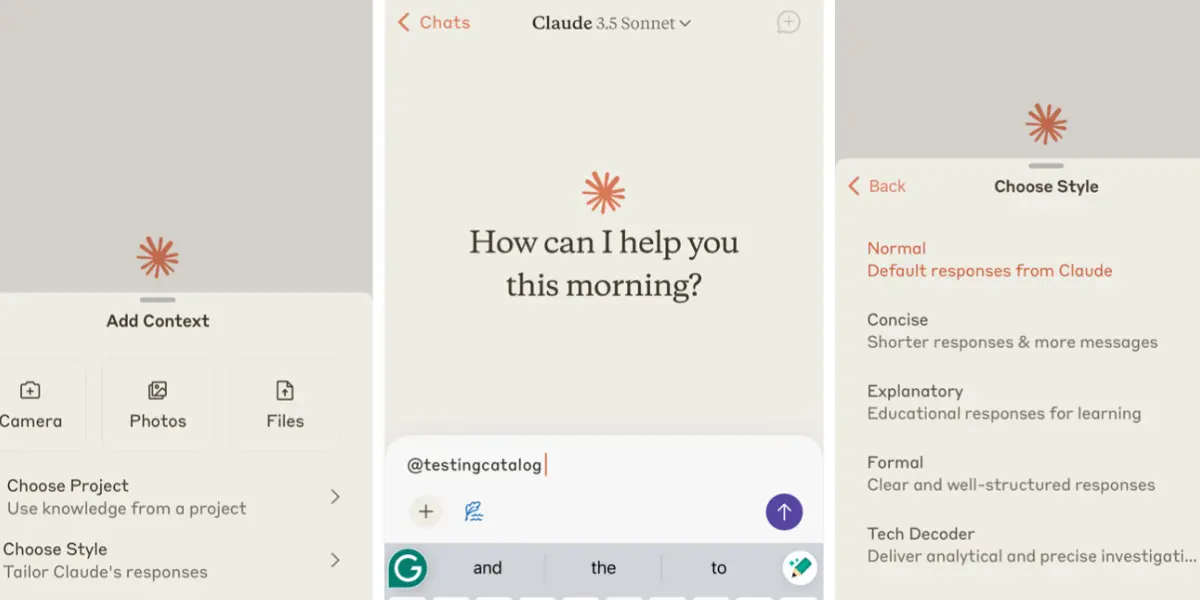
Claude is the strongest free chatgpt alternative available in 2026 — full stop. Where ChatGPT sometimes loses the thread in long conversations, Claude maintains context brilliantly across extended exchanges. It’s noticeably better at long-form writing, careful reasoning, and producing content that sounds genuinely human rather than AI-generated. Claude also tends to be more honest about what it doesn’t know — it’s less likely to confidently make things up, which matters a lot if you’re relying on the output. The free plan is generous enough for most daily use cases, making it the first alternative most people should try.
✅ Pros
- Best long-form writing quality
- Excellent context retention
- Less likely to hallucinate
- More nuanced, human-sounding output
❌ Cons
- Free plan has daily message limits
- No image generation
- Less versatile than ChatGPT for some tasks
Google Gemini is one of the most powerful free chatgpt alternative ai tools available — especially if you need current, real-world information. Unlike ChatGPT, Gemini connects directly to Google Search, which means it can pull live data, recent news, stock prices, and up-to-date facts without any plugins or workarounds. It also integrates natively with Google Docs, Gmail, and Google Drive if you’re on a Google Workspace plan. For students, researchers, and anyone who constantly asks questions that require recent information, Gemini is one of the most practical alternatives to chatgpt you’ll find for free.
✅ Pros
- Real-time Google Search integration
- Always up-to-date information
- Integrates with Google Workspace
- Multimodal (text, images, audio)
❌ Cons
- Writing quality behind Claude
- Can over-rely on search results
- Less consistent for creative tasks
Microsoft Copilot is one of the most accessible apps like chatgpt because it’s already built into Windows, Edge, and Bing — no separate account needed in most cases. It runs on GPT-4 under the hood and also connects to live web search, so the information is current. For business users already working in Word, Excel, Outlook, and Teams, Copilot works directly inside those tools on the paid plan. The free version via Bing or the Windows taskbar is genuinely capable and requires zero setup — making it one of the best chatgpt alternatives without login for casual everyday use.
✅ Pros
- Built into Windows — no sign-up needed
- Real-time web search included
- Deep Microsoft 365 integration
- GPT-4 quality on free plan
❌ Cons
- Less creative than ChatGPT or Claude
- Best features require paid 365 plan
- Responses can feel overly cautious
Perplexity AI takes a different approach to all the other chatgpt competitors on this list: instead of just generating text, it searches the web in real time and gives you a cited, synthesised answer — like Google Search if it actually answered your question instead of giving you ten links. Every claim is attributed to a source you can click and verify. This makes it one of the best free chatgpt alternatives with better accuracy for factual questions, research, and anything where you actually need to trust the output. It’s not the right tool for creative writing — but for “give me the facts on X” tasks, nothing beats it.
✅ Pros
- Every answer includes citations
- Real-time web search by default
- Great for verifiable, accurate answers
- Excellent free tier
❌ Cons
- Not for creative writing or brainstorming
- Pro searches limited on free plan
- Lacks conversational depth
Meta AI is the most frictionless of all the free alternatives — if you use WhatsApp, Instagram, or Facebook, it’s already there. No new account. No separate app. Just type “@Meta AI” in any chat and start asking questions. It’s powered by Meta’s Llama model and has real-time search built in. It won’t win any awards for creative writing, but for quick questions, summaries, translation, and everyday tasks, it works surprisingly well. For anyone who wants chatgpt alternatives without login or a completely new app to manage, Meta AI is the easiest entry point available.
✅ Pros
- No login or new account needed
- Works inside WhatsApp & Instagram
- Real-time search included
- Completely free
❌ Cons
- Less capable than Claude or Gemini
- Limited for complex tasks
- No desktop-focused interface
Paid ChatGPT Alternatives
If you’re ready to invest in something more powerful, these are the paid alternatives worth every penny — each one beats ChatGPT Plus in a specific area.
Claude Pro is the paid upgrade worth considering if you do any serious amount of writing. At the same $20/month price as ChatGPT Plus, you get higher message limits, priority access, and Claude’s Sonnet and Opus models — which produce noticeably better long-form content than GPT-4o for most writing use cases. If you’re using chatgpt alternatives for writing — blog posts, essays, scripts, reports, emails — Claude Pro is the clearest upgrade. The difference in quality on a 2,000-word piece is genuinely noticeable, especially around tone consistency and avoiding the “AI voice” that makes content sound generic.
✅ Pros
- Best writing quality at this price point
- Higher usage limits than free
- Access to Claude’s most powerful models
- Same price as ChatGPT Plus
❌ Cons
- No image generation
- Less versatile than ChatGPT for coding
- No plugin ecosystem
Gemini Advanced runs on Google’s most powerful model (Gemini Ultra) and integrates deeply into the entire Google ecosystem. If you live in Google Docs, Sheets, Gmail, and Meet, this is the most natural upgrade you can make. It drafts emails in your Gmail style, analyses data in Sheets, summarises Google Docs, and generates meeting notes in Meet — all without copy-pasting anything. For chatgpt alternatives for business users already on Google Workspace, Gemini Advanced is the most seamlessly integrated option. The $19.99/month is included in Google One AI Premium, which also gives you 2TB of storage.
✅ Pros
- Deep Google Workspace integration
- Real-time search always on
- Multimodal — text, images, video, audio
- Includes 2TB Google One storage
❌ Cons
- Writing quality behind Claude Pro
- Less useful outside Google ecosystem
- Creative tasks still inconsistent
Jasper isn’t trying to be a general-purpose AI — it’s purpose-built for marketing and content creation, and that focus makes it one of the best chatgpt alternatives for content creation. Where ChatGPT needs a good prompt to produce on-brand output, Jasper’s Brand Voice feature trains on your existing content and then writes in your exact style every time. It has 50+ marketing-specific templates — ad copy, blog posts, product descriptions, email sequences, social captions — and a Campaign Workflow that can produce a full content suite from a single brief. For teams producing high volumes of marketing content, it’s a clear upgrade.
✅ Pros
- Brand voice consistency per client
- 50+ marketing content templates
- Campaign workflow feature
- Team collaboration built-in
❌ Cons
- Expensive for individual users
- Overkill for general AI chat use
- No free plan
If you’re a developer looking for chatgpt alternatives for coding, GitHub Copilot is in a different league. It works directly inside VS Code, JetBrains, and other major IDEs — autocompleting code, suggesting entire functions, explaining errors, writing tests, and translating code between languages in real time. It’s trained specifically on billions of lines of code, which gives it a depth of programming knowledge that general-purpose AI tools like ChatGPT can’t match. Copilot Chat lets you ask questions about your codebase directly. For developers who want an AI that actually understands the code they’re working on, this is the best option available.
✅ Pros
- Works inside your IDE in real time
- Deep coding-specific training
- Explains, debugs & writes tests
- Very affordable at $10/month
❌ Cons
- Only useful for coding tasks
- Not a general-purpose AI assistant
- Suggestions need human review
Perplexity Pro is the upgrade for anyone who does serious research and needs an AI that can back up every claim with a real source. The Pro plan gives you unlimited searches, access to multiple AI models (including Claude and GPT-4o) within the same interface, file upload and analysis, and a focus mode for deep research reports. For students, academics, journalists, and analysts who need chatgpt alternatives with better accuracy for research-heavy work, Perplexity Pro is a genuinely different kind of tool. The cited-answer format alone eliminates the hallucination risk that makes most AI tools unreliable for factual research.
✅ Pros
- Every answer cited with sources
- Unlimited searches on Pro
- Access to multiple AI models
- Deep research report mode
❌ Cons
- Not for creative writing or brainstorming
- Less conversational than ChatGPT
- Interface less polished than competitors
AI Tools Like ChatGPT for Different Use Cases
The honest answer to “which is best?” is: it depends entirely on what you’re doing. Here’s a clean breakdown of the best pick for each major use case — so you can find your match without reading every review.
✍️ Writing & Content Creation
- Claude Pro — best overall writing quality
- Jasper — best for brand-consistent volume
- ChatGPT Plus — best all-rounder for writers
- Claude (free) — best free writing tool
💻 Coding & Development
- GitHub Copilot — best in-IDE coding assistant
- Claude — best for code explanation & docs
- Gemini Advanced — best for Google Cloud dev
- ChatGPT Plus — best general coding assistant
🔍 Research & Accuracy
- Perplexity Pro — best cited research tool
- Perplexity (free) — best free research option
- Gemini — best for real-time Google data
- Microsoft Copilot — best free with web search
🎓 Students & Everyday Use
- Claude (free) — best free quality assistant
- Gemini (free) — best for Google integration
- Meta AI — best for no-login casual use
- Microsoft Copilot — best built-in Windows tool
Quick Comparison Table
| Tool | Free Plan | Paid Plan | Best For | Our Rating |
|---|---|---|---|---|
| Claude | ✅ Yes | $20/mo | Writing & long-form | ⭐⭐⭐⭐⭐ |
| Google Gemini | ✅ Yes | $19.99/mo | Search & Google users | ⭐⭐⭐⭐⭐ |
| Microsoft Copilot | ✅ Built-in | $30/user/mo | Office & business | ⭐⭐⭐⭐⭐ |
| Perplexity AI | ✅ Yes | $20/mo | Research & accuracy | ⭐⭐⭐⭐⭐ |
| Meta AI | ✅ Free only | ❌ N/A | Casual & no-login | ⭐⭐⭐⭐ |
| Claude Pro | ✅ Limited | $20/mo | Best paid writing | ⭐⭐⭐⭐⭐ |
| Gemini Advanced | ✅ Basic free | $19.99/mo | Google Workspace | ⭐⭐⭐⭐ |
| Jasper | ❌ Trial | $39/mo | Marketing & content | ⭐⭐⭐⭐ |
| GitHub Copilot | ✅ Limited | $10/mo | Coding & development | ⭐⭐⭐⭐⭐ |
| Perplexity Pro | ✅ Limited | $20/mo | Deep research | ⭐⭐⭐⭐⭐ |
What Is the Best Alternative to ChatGPT?
For most people: Claude. It’s free, it’s excellent for writing and reasoning, and it’s less likely to confidently produce wrong information. If you need real-time information: Perplexity AI or Google Gemini. If you’re a developer: GitHub Copilot. If you’re already in the Microsoft ecosystem: Copilot. There isn’t one universal answer — the best alternative is the one that solves your specific frustration with ChatGPT.
Are There Better Tools Than ChatGPT?
Yes — in specific areas. Claude produces better long-form writing. GitHub Copilot is better for coding inside an IDE. Perplexity AI is better for factual accuracy and cited research. Google Gemini is better when you need real-time information. The key word is “specific” — for general versatility, ChatGPT Plus is still one of the strongest all-rounders. But calling it the best at everything in 2026 would be inaccurate.
Which AI Is Better Than ChatGPT?
For writing quality: Claude. For research accuracy: Perplexity. For coding: GitHub Copilot. For Google integration: Gemini Advanced. For free daily use without a new account: Microsoft Copilot. Each of these similar tools to chatgpt wins in its lane — the question is which lane matters most to you.
Are Free ChatGPT Alternatives Good?
Several of them are genuinely excellent. Claude’s free plan is arguably better than ChatGPT’s free plan for writing tasks. Perplexity’s free tier covers most research needs. Microsoft Copilot is free and built into Windows. Gemini’s free plan is solid for everyday use with Google Search integration. You don’t need to pay $20/month to get a great AI assistant in 2026 — the free options have improved dramatically.
Frequently Asked Questions
🏆 Final Verdict
The best ChatGPT alternatives in 2026 aren’t just cheaper copies — several are genuinely better for specific tasks. The competition has caught up, and in some areas, overtaken.
Our top picks: Claude for writing and everyday use (free and paid), Perplexity AI for research and accuracy, Google Gemini for real-time information and Google users, and GitHub Copilot for developers. For business users on Microsoft 365, Copilot is already built in and worth exploring.
Start with Claude’s free plan — it’s the most well-rounded alternative and requires no commitment to evaluate. If you need citations and real-time data, run Perplexity alongside it. That two-tool combination covers 90% of what most users reach for ChatGPT to do.
Found this helpful? Share it! 🙌